Iskay Quantum Optimizer - A Qiskit Function by Kipu Quantum
Di Siite isch nonig übersetzt worde. Dir luege d englischi Originalversion aa.
See the API reference
- Qiskit Functions are an experimental feature available only to IBM Quantum® Premium Plan, Flex Plan, and On-Prem (via IBM Quantum Platform API) Plan users. They are in preview release status and subject to change.
Overview
With the Iskay Quantum Optimizer by Kipu Quantum, you can tackle complex optimization problems using IBM® quantum computers. This solver leverages Kipu's cutting-edge bf-DCQO algorithm requiring only the objective function as input to automatically deliver problem solutions. It can handle optimization problems involving up to 156 qubits, enabling the use of all qubits of the IBM quantum devices. The Optimizer uses a 1-to-1 mapping between classical variables and qubits, which allows you to tackle optimization problems with up to 156 binary variables.
The Optimizer enables the solving of unconstrained binary optimization problems. In addition to the commonly used QUBO (Quadratic Unconstrained Binary Optimization) formulation, it also supports higher-order (HUBO) optimization problems. The solver utilizes a non-variational quantum algorithm, performing most of the computation on quantum devices.
The following provides more details about the used algorithm and a brief guide on how to use the function, as well as benchmarking results on various problem instances of different sizes and complexities.
Description
The Optimizer is a ready-to-use implementation of cutting-edge quantum optimization algorithms. It solves optimization problems by running highly-compressed quantum circuits on quantum hardware. This compression is achieved by introducing counterdiabatic terms into the underlying time evolution of the quantum system. The algorithm executes several iterations of hardware runs to obtain the final solutions and combines it with post-processing. These steps are seamlessly integrated into the Optimizer's workflow and are executed automatically.
How does the Quantum Optimizer work?
This section outlines the basics of the implemented bf-DCQO algorithm. An introduction to the algorithm can also be found on the Qiskit YouTube channel.
The algorithm is based on the time evolution of a quantum system which is transformed over time, where the problem solution is encoded in the ground state of the quantum system at the end of the evolution. According to the adiabatic theorem, this evolution has to be slow to ensure the system remains in its ground state. Digitizing this evolution is the basis of digitized quantum adiabatic computation (DQA) and the infamous QAOA algorithm. However, the required slow evolution is not feasible for increasing problem sizes since it results in an increasing circuit depth. By using counterdiabatic protocols, you can suppress unwanted excitations occurring during short evolution times while remaining in the ground state. Here, digitizing this shorter evolution time results in quantum circuits with shorter depth and fewer entangling gates.
The circuits of the bf-DCQO algorithms typically use up to ten times fewer entangling gates than DQA, and three to four times fewer entangling gates than standard QAOA implementations. Because of the smaller number of gates, fewer errors occur during the circuit execution on hardware. Hence, the optimizer does not require using techniques like error suppression or error mitigation. Implementing them in future versions can enhance the solution quality even further.
Although the bf-DCQO algorithm uses iterations, it is non-variational. After each iteration of the algorithm, the distribution of states is measured. The obtained distribution is used to calculate a so-called bias-field. The bias-field allows starting the next iteration from an energy state near the previously found solution. In this way, the algorithm moves with each iteration to solutions of lower energy. Typically, approximately ten iterations are sufficient to converge to a solution, in total requiring a much lower number of iterations than variational algorithms, which is on the order of approximately 100 iterations.
The optimizer combines the bf-DCQO algorithm with classical post-processing. After measuring the distribution of states, a local search is performed. During the local search, the bits of the measured solution are randomly flipped. After the flip, the energy of the new bitstring is evaluated. If the energy is lower, the bitstring is kept as the new solution. The local search only scales linearly with the number of qubits; hence, it is computationally cheap. Since the post-processing corrects local bitflips, it compensates for bit-flip errors that often are the result of hardware imperfections and readout errors.
Workflow
A schematic of the workflow of the Quantum Optimizer follows.
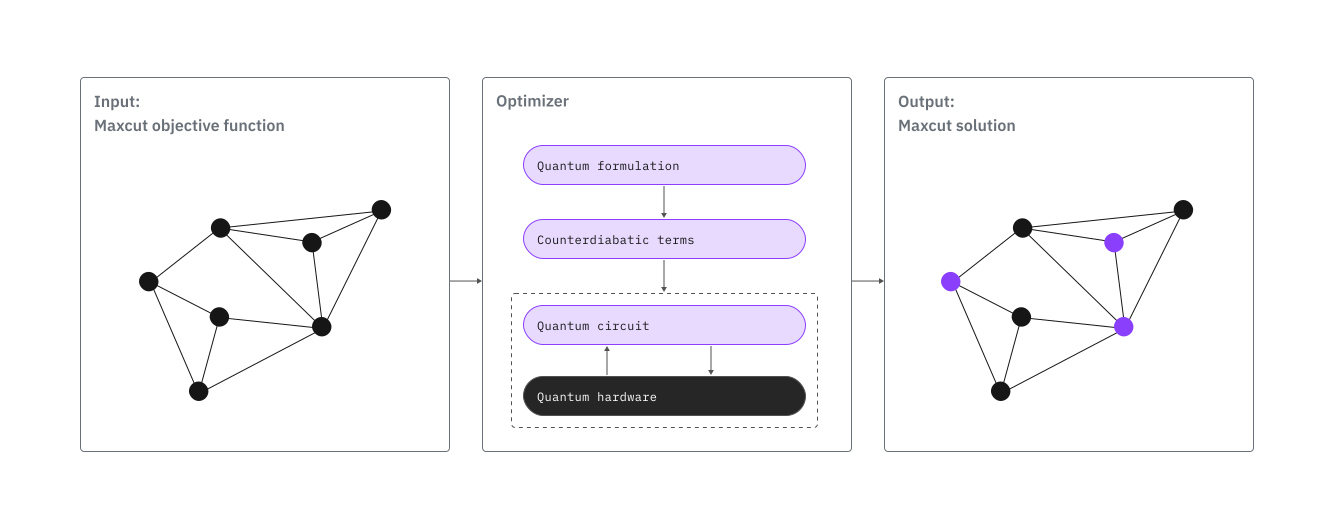
By using the Quantum Optimizer, solving an optimization problem on quantum hardware can be reduced to
- Formulate the objective function of the problem
- Access the Optimizer via Qiskit Functions
- Run the Optimizer and collect the result
Benchmarks
The benchmark metrics below show that the Optimizer effectively addresses problems involving up to 156 qubits and offer a general overview of the optimizer's accuracy and scalability across different problem types. Note that actual performance metrics may vary depending on specific problem characteristics, such as the number of variables, the density and locality of terms in the objective function, and the polynomial order.
The following table includes the approximation ratio (AR), a metric defined as follows:
where is the objective function, , are its minimum and maximum values, and is the cost of the best solution found, respectively. Therefore, AR=100% means that the ground state of the problem has been obtained.
| Example | Number of qubits | Approximation Ratio | Total time (s) | Runtime usage (s) | Total Number of shots | Number of iterations |
|---|---|---|---|---|---|---|
| Unweighted MaxCut | 28 | 100% | 180 | 30 | 30k | 5 |
| Unweighted MaxCut | 30 | 100% | 180 | 30 | 30k | 5 |
| Unweighted MaxCut | 32 | 100% | 180 | 30 | 30k | 5 |
| Unweighted MaxCut | 80 | 100% | 480 | 60 | 90k | 9 |
| Unweighted MaxCut | 100 | 100% | 330 | 60 | 60k | 6 |
| Unweighted MaxCut | 120 | 100% | 370 | 60 | 60k | 6 |
| HUBO 1 | 156 | 100% | 600 | 70 | 100k | 10 |
| HUBO 2 | 156 | 100% | 600 | 70 | 100k | 10 |
- The MaxCut instances with 28, 30, and 32 qubits were run on ibm_sherbrooke. Instances with 80, 100, and 120 were run on a Heron r2 processor.
- The HUBO instances were also run on a Heron r2 processor.
All the benchmark instances are accessible on GitHub (see Kipu benchmark instances). An example to run these instances can be found in Example 3: Benchmark instances.
Get started
In this documentation, we will go through the steps of using the Iskay Quantum Optimizer. In the process we will quickly show how to load the function from the catalog and how to convert your problem to a valid input, all while showing how you can experiment with different optional parameters.
For a more detailed example, please check out the tutorial Solve the Market Split problem with Kipu Quantum's Iskay Quantum Optimizer, where we work through the whole process of using Iskay Solver to address the Market Split problem, which represents a real-world resource allocation challenge where markets must be partitioned into balanced sales regions to meet exact demand targets.
Authenticate using your API key, found on the IBM Quantum Platform dashboard, and select the Qiskit Function as follows:
# Added by doQumentation — required packages for this notebook
!pip install -q PyGithub networkx qiskit-ibm-catalog
# ruff: noqa: F821
The following code assumes that you have saved your credentials. If you have not, follow the instructions in save your IBM Cloud account to authenticate with your API key.
from qiskit_ibm_catalog import QiskitFunctionsCatalog

catalog = QiskitFunctionsCatalog(
    channel="ibm_quantum_platform",
    instance="INSTANCE_CRN",
    # For `token`, use the 44-character API_KEY you created
    # and saved from the IBM Quantum Platform Home dashboard
    token="YOUR_API_KEY",
)

# verify that you have access to the function
catalog.list()
[QiskitFunction(qunova/hivqe-chemistry),
 QiskitFunction(global-data-quantum/quantum-portfolio-optimizer),
 QiskitFunction(algorithmiq/tem),
 QiskitFunction(qedma/qesem),
 QiskitFunction(multiverse/singularity),
 QiskitFunction(ibm/circuit-function),
 QiskitFunction(q-ctrl/optimization-solver),
 QiskitFunction(colibritd/quick-pde),
 QiskitFunction(q-ctrl/performance-management),
 QiskitFunction(kipu-quantum/iskay-quantum-optimizer)]
# Access Function
optimizer = catalog.load("kipu-quantum/iskay-quantum-optimizer")
Custom configuration example
Here's how you might configure Iskay with different settings:
custom_options = {
    "shots": 15_000,  # Higher shot count for better statistics
    "num_iterations": 12,  # More iterations for solution refinement
    "preprocessing_level": 1,  # Light preprocessing for problem simplification
    "postprocessing_level": 2,  # Maximum postprocessing for solution quality
    "transpilation_level": 3,  # Use higher transpilation level to optimize circuit
    "seed_transpiler": 42,  # Fixed seed for reproducible results
    "job_tags": ["custom_config"],  # Custom tracking tags
}
Seed optimization: Note that seed_transpiler is set to None by default. This enables the transpiler's automatic optimization process. When None, the system will start a trial with multiple seeds and select the one that produces the best circuit depth, leveraging the full power of the max_trials parameter for each transpilation level.
Transpilation level performance: Increasing the number of max_trials with higher values for transpilation_level will unavoidably increase the transpilation time, but it might not always change the final circuit - this depends heavily on the specific circuit structure and complexity. For some circuits/problems, however, the difference between 10 trials (level 1) and 50 trials (level 5) can be dramatic, so exploring these parameters might be the key to successfully finding a solution.
Example 1: Simple cost function
Consider the cost function in spin formulation:
where .
The solution to this simple cost function is
with minimum value
1. Create the objective function
We start by creating a dictionary with the coefficients of the objective function as follows:
objective_func = {
    "()": 1,
    "(0,)": 1.5,
    "(1,)": 2,
    "(2,)": 1.3,
    "(0, 3)": 2.5,
    "(1, 4)": 3.5,
    "(0, 1, 2)": 4,
}
2. Run the Optimizer
We solve the problem by running the optimizer. Since we must set problem_type=spin.
# Setup options to run the optimizer
options = {"shots": 5000, "num_iterations": 5, "use_session": True}

arguments = {
    "problem": objective_func,
    "problem_type": "spin",
    "backend_name": backend_name,  # such as "ibm_fez"
    "options": options,
}

job = optimizer.run(**arguments)

# Print the ID so you can use it later, if necessary
print(job.job_id)
3. Retrieve the result
The solution of the optimization problem is provided directly from the optimizer.
print(job.result())
This will show a dictionary of the form:
{'solution': {'0': -1, '1': -1, '2': -1, '3': 1, '4': 1},
 'solution_info': {'bitstring': '11100',
  'cost': -13.8,
  'seed_transpiler': 42,
  'mapping': {0: 0, 1: 1, 2: 2, 3: 3, 4: 4}},
 'prob_type': 'spin'}
Notice that the dictionary solution displays the result vector .
Example 2: MaxCut
Many graph problems like MaxCut or Maximum independent set are NP-hard problems and ideal candidates for testing quantum algorithms and hardware. This example demonstrates solving the MaxCut problem of a 3-regular graph with the Quantum Optimizer.
To run this example you must install the networkx package in addition to the qiskit-ibm-catalog. To install it, run the following command:
# %pip install networkx numpy
1. Create the objective function
Start by generating a random 3-regular graph. For this graph, we define the objective function of the MaxCut problem.
import networkx as nx

# Create a random 3-regular graph
G = nx.random_regular_graph(3, 10, seed=42)

# Create the objective function for MaxCut in Ising formulation
def graph_to_ising_maxcut(G):
    """
    Convert a NetworkX graph to an Ising Hamiltonian for the max-cut problem.
    Args:
        G (networkx.Graph): The input graph.
    Returns:
        dict: The objective function of the Ising model
    """
    # Initialize the linear and quadratic coefficients
    objective_func = {}
    # Populate the coefficients
    for i, j in G.edges:
        objective_func[f"({i}, {j})"] = 0.5
    return objective_func

objective_func = graph_to_ising_maxcut(G)
2. Run the Optimizer
Solve the problem by running the optimizer.
options = {"shots": 5000, "num_iterations": 5, "use_session": True}

arguments = {
    "problem": objective_func,
    "problem_type": "spin",
    "backend_name": backend_name,  # such as "ibm_fez"
    "options": options,
}

job = optimizer.run(**arguments)
3. Retrieve the result
Retrieve the result and map the solution bitstring back to the original graph nodes.
print(job.result())
The solution to the Maxcut problem is directly contained in the solution sub-dictionary of the result object
maxcut_solution = job.result()["solution"]
Example 3: Benchmark instances
The benchmark instances are available on GitHub: Kipu benchmark instances.
The instances can be loaded using the pygithub library. To install it, run the following command:
# %pip install pygithub
The paths for the benchmark instances are:
Maxcut:
'maxcut/maxcut_regular_3_100_nodes_weighted.json''maxcut/maxcut_regular_3_140_nodes_weighted.json''maxcut/maxcut_regular_3_150_nodes_weighted.json''maxcut/maxcut_regular_4_130_nodes_weighted.json'
HUBO:
'HUBO/hubo1_marrakesh.json''HUBO/hubo2_marrakesh.json'
To reproduce the performance of the benchmark for the HUBO instances, select the backend ibm_marrakesh and set direct_qubit_mapping to True in the options sub-dictionary.
The following example runs the Maxcut instance with 150 nodes.
from github import Github
import urllib
import json
import ast

repo = "Kipu-Quantum-GmbH/benchmark-instances"
path = "maxcut/maxcut_regular_3_150_nodes_weighted.json"
gh = Github()
repo = gh.get_repo(repo)
branch = "main"
file = repo.get_contents(urllib.parse.quote(path), ref=branch)

# load json file with benchmark problem
problem_json = json.loads(file.decoded_content)

# convert objective function to compatible format
objective_func = {
    key: ast.literal_eval(value) for key, value in problem_json.items()
}

# Setup configuration to run the optimizer
options = {
    "shots": 5_000,
    "num_iterations": 5,
    "use_session": True,
    "direct_qubit_mapping": False,
}

arguments = {
    "problem": objective_func,
    "problem_type": "spin",
    "backend_name": "<BACKEND-NAME>",
    "options": options,
}

job = optimizer.run(**arguments)

result = job.result()
Use cases
Typical use cases for the Optimization solver are combinatorial optimization problems. You can solve problems from many industries like finance, pharmaceutics, or logistics. Some examples follow.
- Portfolio optimization (QUBO): scientific publication and white paper
- Protein folding (HUBO): scientific publication
- Logistics scheduling (QUBO): scientific publication
- Network optimization: webinar
- Market split (QUBO): tutorial
If you are interested in tackling a specific use case and develop a dedicated mapping, we can assist you. Contact us.
Get support
For support, contact support@kipu-quantum.com.
Next steps
- Request access to the Quantum Optimizer by Kipu Quantum.
- Visit the API reference for this Qiskit Function.
- Try the Solve the Market Split problem with Kipu Quantum's Iskay Quantum Optimizer tutorial.
- Review Romero, S. V., et al. (2025). Bias-Field Digitized Counterdiabatic Quantum Algorithm for Higher-Order Binary Optimization. arXiv preprint arXiv:2409.04477.
- Review Cadavid, A. G., et al. (2024). Bias-field digitized counterdiabatic quantum optimization. arXiv preprint arXiv:2405.13898.
- Review Chandarana, P., et al. (2025). Runtime Quantum Advantage with Digital Quantum Optimization. arXiv preprint arXiv:2505.08663.
Additional information
Iskay, like our company name Kipu Quantum, is a Peruvian word. Although we are a startup from Germany, these words come from the native country of one of our co-founders, where the Quipu was one of the very first calculation machines developed by mankind 2000 years BCE.